
Billing Summary
As a subscriber in Massachusetts, you will receive two bills for the same period. On the first, your Eversource bill, you will see a line item called “Net Metering Credit”. That amount is the full value of your solar credits and is subtracted from your bill.
Your second bill will come from PureSky Energy around two months after you receive your Eversource bill. PureSky gives you a discount on your solar credits, so this second bill will always be less than the “Net Metering Credit” on your first bill.
When you review your Eversource bill and your PureSky Energy invoice, you may notice a few additional line items. Here’s how to read them and understand what they mean.
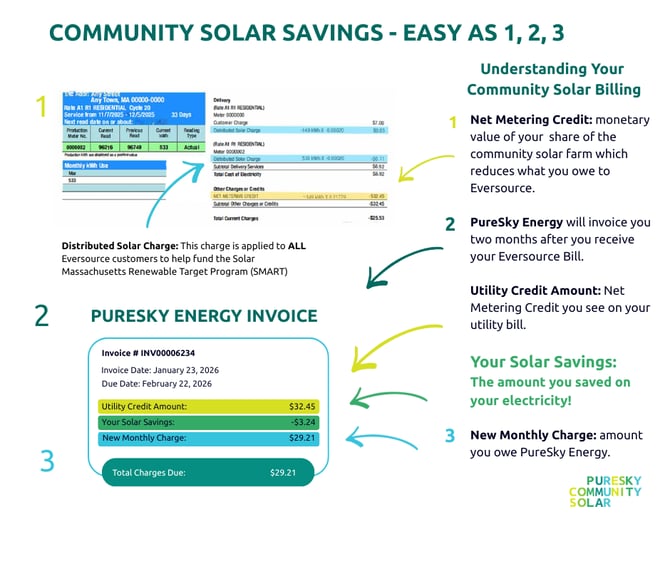
1. Look for the Community Solar Credit
At the top of your Eversource bill, nothing has changed; you’ll still see your standard Eversource supply and delivery charges, calculated the same way they always have been.
Next, under Other Charges or Credits, find the line item labeled:
Net Metering Credit
This amount represents the full value of the solar energy produced by your share of the community solar project during the billing period. This credit is applied directly to your bill and reduces what you owe to Eversource.
Think of this credit like a payment made on your behalf.
2. Confirm Your Savings and Review Your PureSky Energy Invoice
How to read your PureSky Community Solar Invoice:
- Utility credit amount is your total share of the community solar farm without the discount. It should match the Net Metering Credit on your Eversource bill from approximately two months earlier.
- Your solar savings are the discount on your share of the community solar farm.
- New monthly charges are the amount you owe PureSky Energy for your share of the community solar farm with the discount.
Example:
$32.45 - $3.24 = $29.21
3. How to Pay your Invoice on Your PureSky Energy Portal
You will receive an email with your invoice. You can easily pay online and manage your account through visiting your PureSky Energy Portal.
4. What You Should (and Shouldn’t) See
✅Clear line items showing credits and fees
✅ Guaranteed savings every month
❌ No hidden charges ❌ No changes to your electric service or reliability
Need Help Reading Your Bill?
If you have questions about a specific line item on your Eversource bill or want help understanding your community solar savings, contact Customer Care at customercare@pureskyenergy.com or 1-877-267-8727.